
Disclosure: Some links below are affiliate links. If you sign up through one, we may earn a commission at no extra cost to you. We only recommend tools we believe genuinely help US real estate agents, and all opinions are our own.
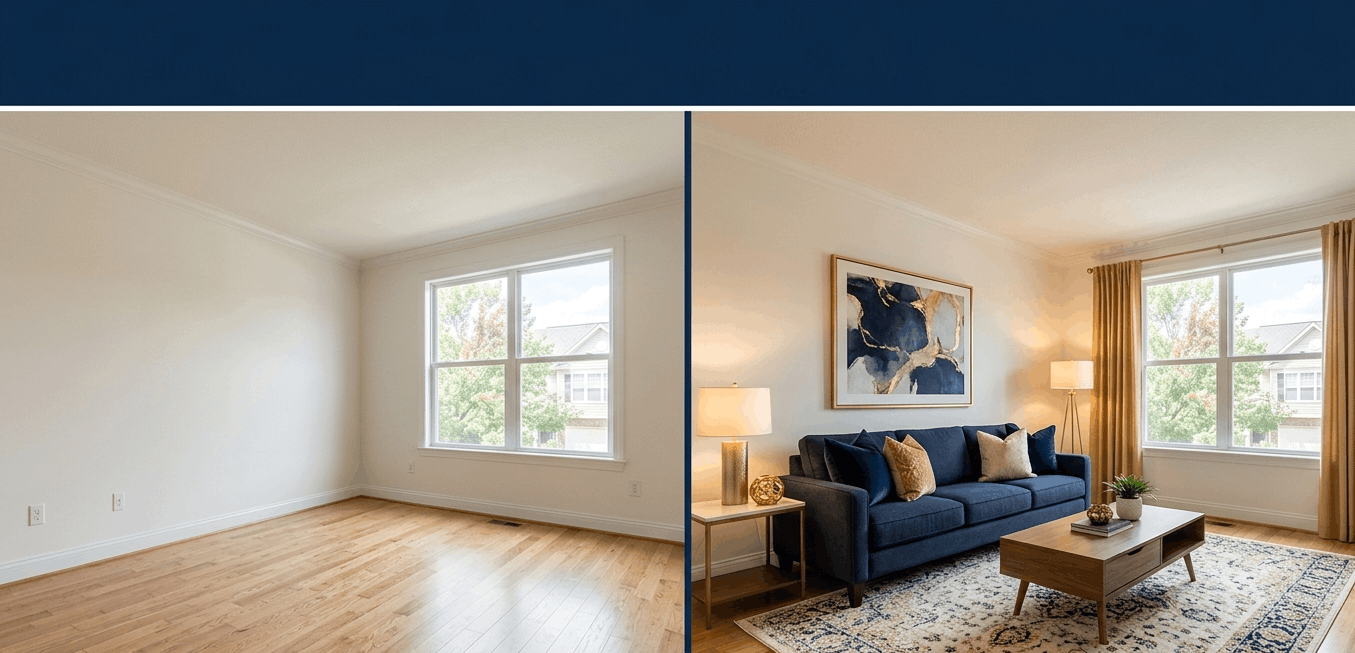
The best AI virtual staging software turns an empty room into a warm, photographed-looking, buyer-ready space in seconds — for a few dollars instead of the hundreds or thousands physical staging costs. And in 2026, the quality jump is the real headline: the top tools now produce staging that’s genuinely hard to tell apart from a furnished room shot by a professional.
This guide focuses on the AI-first end of staging specifically — instant, DIY, and cheap. (For the full field, including traditional designer-led services, see our broader virtual staging software guide.) Here, the question is narrower and more practical: which AI tool gets you MLS-ready photos fastest, at the right price for how many listings you actually run?
Why AI Virtual Staging Is a No-Brainer in 2026
The economics aren’t close. AI staging runs roughly a few dollars per image; physical staging runs $800–$2,900 per property (often more in luxury markets). Studies have consistently found that staged listings tend to sell faster and for more than comparable empty homes — so you’re trading a few dollars for a real edge on price and days-on-market.
Speed is the second reason. The fastest AI tools stage a room in 10–60 seconds, which means you can shoot a vacant listing in the morning and publish fully staged photos to the MLS that afternoon. No furniture rental, no scheduling, no waiting.
The one rule you can’t skip: disclosure. AI-staged photos look real precisely because they are convincing — which is exactly why your MLS and the NAR Code of Ethics require you to disclose that photos are virtually staged (and usually to keep the originals). Done right, that’s a non-issue; we cover it in Section 4.
How We Compared These Tools — The 5 Criteria
- Output realism. Does the result look like a real photographed room, or obviously AI? Shadows, reflections, and room proportions are where cheap tools fall apart.
- Speed. Instant AI (seconds to a minute) versus human-edited turnaround (24–48 hours). For a listing on a deadline, speed is everything.
- Pricing vs. volume. Per-image pricing wins at low volume; a monthly subscription wins once you’re staging several listings a month. The right tool depends on your deal flow.
- Feature range. Just staging, or also furniture removal, decluttering, exterior/landscaping edits, renovation previews, and 360° tours?
- MLS compliance support. Does it make disclosure easy — watermarks, before/after originals, compliance flags — so you stay inside the rules?
The Tools at a Glance
| Tool | Best for | Pricing (2026) | Speed | Type |
|---|---|---|---|---|
| REimagineHome | All-around AI staging + decluttering + exteriors | $19–119/mo (free trial) | Under 1 min | AI-first |
| Virtual Staging AI | The fastest turnaround | Monthly plans / ~$16+ per image | ~15 sec | AI-first |
| Collov AI | High volume on a tight budget | $19–39/mo (5 free images) | ~10 sec | AI-first |
| Styldod | Luxury & complex listings, human-reviewed | $16–23/image (AI); human tiers | 24–48 hr | Hybrid / human |
| BoxBrownie | Polished, human-edited at low volume | ~$24/image | 24–48 hr | Human |
Two Routes: Instant AI vs. Human-Polished
The whole market splits cleanly in two, and picking your route first makes the rest of the decision easy:
- Route 1 — Instant AI tools: REimagineHome, Virtual Staging AI, Collov AI. Photos back in seconds to a minute, for a few dollars each or a low monthly fee. This is where most agents should be in 2026.
- Route 2 — Human & hybrid services: Styldod, BoxBrownie. A real editor (or AI plus human review) polishes each image over 24–48 hours. Slower and pricier per photo, but the right call for luxury listings where every detail has to be perfect.
Route 1: Instant AI Staging Tools
This is where most agents should be in 2026. These three stage a room in seconds to a minute, for a few dollars or a low monthly fee, with no design skill required. They’re the core of any list of the best AI virtual staging software — the differences come down to speed, extras, and price-per-volume.
| REimagineHome | Virtual Staging AI | Collov AI | |
|---|---|---|---|
| Price | $19–119/mo (free trial) | Monthly plans / ~$16+ per image | $19–39/mo (5 free images) |
| Speed | Under 1 min | ~15 seconds | ~10 seconds |
| Beyond staging | Declutter, exteriors, renovation, compliance flags | Staging-focused | Furniture removal, shoppable furniture |
| Best for | All-around + end-to-end vacant prep | Pure speed | High volume on a budget |
REimagineHome — The All-Around Pick
REimagineHome is the one to try first, and it’s the easiest to recommend for agents new to AI staging. It was built by Styldod, a professional staging and photo-editing company, and its AI is trained on real staging projects rather than generic furniture catalogs — which shows up in the details that usually give AI away: shadow placement, reflections, and getting room proportions right. You pick from 50+ design styles, and the tool applies professional staging logic automatically, so you get polished results without any design knowledge.
What sets it apart is range. Most tools only stage; REimagineHome also declutters, removes furniture, edits exteriors and landscaping, and previews renovations — all under one credit pool. For prepping a vacant listing end-to-end (stage the interior, clear the clutter, clean up the front-yard photo), that’s the most efficient single subscription. It also flags compliance per photo, offers a human-assisted option, and has an API for brokerages. Pricing scales from $19/month (30 images) up to $119/month (1,200 images), with a free trial to test it.
The one catch: once you blow past your included credits, the per-image cost runs higher than the cheapest bulk tools. At extreme volume, a budget option may edge it out on price alone.
REimagineHome
Best for: Agents and teams who want realistic, MLS-ready staging plus decluttering and exterior edits in one tool — and the best starting point if you’re new to AI staging.
NOT for: Ultra-high-volume operations chasing the absolute lowest price per image, where a bulk-rate tool wins.
Virtual Staging AI — The Fastest
If your one need is “stage this empty room right now,” Virtual Staging AI is the quickest on the list — browser-based, no install, and roughly 15 seconds from upload to a furnished photo. It offers 50+ interior styles and requires zero design knowledge, and it handles occupied listings (not just vacant ones) more flexibly than most, which makes it the versatile pick when your photos aren’t all empty rooms.
The trade-off is breadth: it’s staging-focused, so you won’t find the same deep extras (exteriors, renovation previews, large credit pools) that REimagineHome bundles in.
Virtual Staging AI
Best for: Agents who prize raw speed and need a dead-simple, browser-based tool for both vacant and occupied listings.
NOT for: Agents who want one tool to also handle decluttering, exteriors, and renovation previews.
Collov AI — Best Value at Volume
Collov AI is the budget champion. At $19/month for the entry tier (with 5 free images to start) and around 10-second generation, the per-listing cost gets very low once you’re staging in volume — and reviewers consistently note its output doesn’t look obviously AI, which matters if brand aesthetic is part of your listings. It includes 50+ styles, unlimited free revisions, native furniture removal, and partnerships with furniture retailers so the staged pieces reflect real, shoppable products.
The limit is flexibility: style customization is more preset-constrained than the others, so if you want fine creative control over every placement, it’s not the tool.
Collov AI
Best for: High-volume agents on a tight budget who want clean, natural-looking staging fast.
NOT for: Agents who need granular creative control over styling and placement.
Bottom line for Route 1: for most agents, REimagineHome is the all-around pick — and the only one that takes a vacant listing from staged to decluttered to exterior-ready in one place. Choose Virtual Staging AI if pure speed wins, or Collov AI if you’re staging a lot of listings and watching every dollar.
Route 2: Human & Hybrid Services
Instant AI wins on price and speed — but for a luxury listing where every detail gets scrutinized, or a full virtual tour that has to stay consistent across angles, a human in the loop still earns its cost. These two are slower (24–48 hours) and priced per image, but they deliver a polish AI doesn’t always nail on the first try.
| Styldod | BoxBrownie | |
|---|---|---|
| Price | $16–23/image (AI); human tiers $24+ | ~$24/image |
| Turnaround | 24–48 hours | 24–48 hours |
| Standout | 360° Matterport staging, renovation & 3D, human QA | Full human photo-editing suite |
| Best for | Luxury & multi-angle listings | Hands-off polish on occasional listings |
Styldod — The Luxury & Hybrid Specialist
Styldod is a virtual staging pioneer — so established that its technology actually powers other apps, including REimagineHome. You can use its faster AI tier (around $16–23/image) or send a job to its human-review tier ($24+/image) when AI alone isn’t quite right, with 24–48-hour turnaround and unlimited revisions. The human QA is the point: it keeps a consistent style across every room and maintains visual continuity from angle to angle — which matters enormously on a high-end listing.
Its real differentiator is scope. Styldod is the one tool here that virtually stages 360° panoramic Matterport scenes, not just flat 2D photos, and it adds renovation visuals, floor plans, and 3D renders. For a luxury or architecturally complex property — especially one marketed with a virtual tour — that depth is hard to match.
The trade-offs are the obvious ones: it’s slower than instant AI, and the per-image cost adds up if you’re staging high volume.
Styldod
Best for: Luxury and architecturally complex listings, virtual-tour staging, and any job where multi-angle consistency and design judgment outweigh instant turnaround.
NOT for: High-volume agents who need photos back in seconds — that’s a Route 1 job.
BoxBrownie — The Hands-Off Polish
BoxBrownie is the go-to human-edited service for agents who’d rather hand it off than DIY. At around $24 per image with 24–48-hour turnaround, real editors do the staging — and because BoxBrownie is a full photo-editing house, you can get image enhancement, item removal, day-to-dusk conversions, and floor plans from the same place. For an agent who stages only occasionally and wants one trusted partner for all their listing photos, that’s a clean setup.
The catch is the same as any per-image human service: it’s slower and pricier than AI, so it doesn’t scale economically if you’re staging many listings a month.
BoxBrownie
Best for: Agents who stage occasionally and want hands-off, human-polished results — plus a one-stop shop for all their listing photo editing.
NOT for: High-volume staging, where per-image human pricing can’t compete with an AI subscription.
Bottom line for Route 2: these cost more and take a day or two, but for luxury listings, virtual tours, or anytime you want a human guaranteeing the result, the polish can be worth it. Pick Styldod for staging-specific depth and 360° work, BoxBrownie for a broader hands-off photo-editing partner.
AI vs. Physical Staging: The Honest Cost & ROI Math
This is the comparison sellers ask about, so it’s worth answering straight. The cost gap is enormous, but cost isn’t the whole story.
| AI virtual staging | Physical staging | |
|---|---|---|
| Cost | ~$0.30–$24 per image | $800–$2,900+ per property |
| Speed | Seconds to 48 hours | Days to weeks |
| Helps your online photos | Yes — dramatically | Yes |
| Helps the in-person walkthrough | No — the home is still empty | Yes |
| Best for | Most listings; the online-first impression | Luxury / high-foot-traffic homes |
For the vast majority of listings, AI virtual staging is the obvious call. Buyers start online — most decide which homes to even visit based on the photos — and a few dollars of staging that makes those photos sing is one of the highest-ROI moves in your marketing. Staged listings consistently tend to sell faster and for more than comparable empty homes, and AI gets you there for a rounding error against your commission.
But here’s the honest limit, because it matters: virtual staging only fixes the photos. When a buyer physically walks through, the home reverts to the empty, echoing space it actually is. For top-of-market properties with heavy foot traffic — where buyers need to sit on the sofa and feel the rooms — traditional physical staging at $1,500–$5,000 can still pull stronger offers. The smart play for most agents: AI-stage every listing for the online impression, and reserve physical staging for the premium homes where the in-person experience closes the deal.
The One Rule You Can’t Skip: Disclosure
AI staging works because it’s convincing — which is exactly why you have to be upfront about it. Under the NAR Code of Ethics, Article 12, agents must be honest and present a “true picture” in their advertising and marketing. Combined with individual MLS photo standards, that means virtually staged photos must be clearly disclosed (and most MLSs want the unedited originals available too).
In practice: label staged photos as “virtually staged,” keep the original empty-room shots, and never use AI to hide a defect or misrepresent the property. Done right, it’s a one-line caption — not a hurdle. For the full step-by-step on staying compliant, use the MLS staging disclosure checklist in our main virtual staging guide.
The Verdict: Which AI Virtual Staging Tool Should You Use?
There’s no single best AI virtual staging software — there’s the one that fits your volume, your listings, and how hands-on you want to be. Here’s the field matched to you:
| Your situation | Best pick | Why |
|---|---|---|
| Most agents (all-around, vacant prep) | REimagineHome | Staging + declutter + exteriors, realistic, free trial |
| Need photos the fastest | Virtual Staging AI | ~15-second turnaround |
| High volume on a tight budget | Collov AI | $19/mo, ~10 sec, natural-looking output |
| Luxury, 360° tours, complex homes | Styldod | Human QA + Matterport 360° staging |
| Occasional listings, fully hands-off | BoxBrownie | Human-edited polish, full photo suite |
| Premium home with heavy foot traffic | Physical staging | Buyers walk through an empty house otherwise |
For most agents, start with REimagineHome’s free trial — it covers the widest range of jobs and is the gentlest learning curve.
Save This: The 5–8 Photo Staging Plan for a Vacant Listing
You don’t need to stage every photo — staging empty rooms that already read as “complete” (kitchens, bathrooms) wastes money. Stage the rooms where buyers make emotional decisions, in this priority order:
- Living room — your hero shot and the first room buyers picture themselves in. Always stage this.
- Primary bedroom — the “this could be mine” room. Always stage.
- Dining area — shows the home works for gathering and entertaining.
- Secondary bedroom or home office — stage it as an office to capture remote-work buyers, or a kid’s room for families.
- Outdoor space (patio/deck) — increasingly a deal-driver; stage it if the listing has one.
- 6–8. Optional: a bonus room/den, a second secondary bedroom, or a breakfast nook — add these for larger or higher-priced homes.
Skip or lightly style: kitchens and bathrooms (built-in cabinets and fixtures already make them look finished), plus hallways, closets, and the laundry room.
The cost math: at roughly $15–30 per image — or “free” inside a monthly subscription — a full 5–8 photo plan runs about $75–$240 per listing on per-image tools, and far less if you’re on a subscription. Against a commission, that’s nothing for photos that decide whether buyers book a showing.
The Bottom Line
AI virtual staging is one of the cheapest, highest-leverage moves in real estate marketing in 2026 — a few dollars to make a vacant listing look like a home buyers want to walk through. For most agents, REimagineHome is the all-around pick; reach for Virtual Staging AI when speed matters, Collov at high volume, and the human services (Styldod, BoxBrownie) for luxury listings. Whatever you choose: stage the rooms that sell, disclose that you did, and keep your originals.
What to Read Next
Round out your listing-marketing stack:
- Best Virtual Staging Software (2026) — the full roundup, including traditional designer-led services and the complete MLS disclosure checklist.
- Best Real Estate Listing Media Platforms (2026) — photography, video, and 3D tours that pair with your staged photos.
- 7 Best AI Tools for Real Estate Agents (2026) — the wider set of AI tools reshaping how agents work.
- Best Real Estate Website Builders (2026) — where those gorgeous staged listings go to shine.
- Best Zillow Premier Agent Alternatives (2026) — get those listings in front of more buyers.
2 thoughts on “Best AI Virtual Staging Software for Real Estate (2026)”