
Disclosure: Some links in this article are affiliate links. If you sign up through one of them, we may earn a commission at no extra cost to you. Our opinions are our own, and we point out where a different tool fits better.
This REimagineHome review answers the three questions agents ask before paying for an AI staging tool: what does it cost per listing, does it hold up on the MLS, and is it better than the cheaper alternatives? Short answer: it is a strong pick if you stage two or more listings a month, and an expensive habit if you stage one listing a quarter. The sections below show exactly where that line sits, including a worked cost example you can re-run with your own numbers.
How this REimagineHome review was built: from REimagineHome’s published plans and feature descriptions plus independent 2026 reviews, not from a long-term hands-on test. The tool offers free designs with no card required, so the fastest way to settle the quality question is to run one of your own listing photos through it before you pay anything. For a side-by-side with other tools, see our best virtual staging software guide.
Quick Verdict: REimagineHome Review in 60 Seconds
| Question | Answer |
| Best for | Agents staging 2+ listings a month who want MLS-safe staging plus exterior cleanup in one tool |
| Price range | $14–$99/month, credit-based (see the pricing section below) |
| Free option | Yes — a few free designs, no credit card required (as reported by independent reviews) |
| Strongest points | Realistic lighting and shadows, structure stays untouched in staging mode, shoppable furniture, chat refinements cost no credits on Pro and above |
| Weak points | Monthly credits expire, chat editing is not on the entry plan, limited precision control |
| Skip it if | You stage less than one listing every two months (pay per image instead) or need hand-edited luxury hero shots |
What REimagineHome Is (and Who Built It)
REimagineHome is an AI virtual staging and redesign platform built by Styldod, a company with a background in real estate media and virtual staging services. Independent reviews put it at more than 1.5 million registered accounts, with real estate agents among the biggest user groups. You upload a room photo; the AI furnishes it, clears clutter, or restyles it in seconds. Only final renders use credits.
REimagineHome Review: What You Actually Get
Virtual staging for empty and furnished rooms
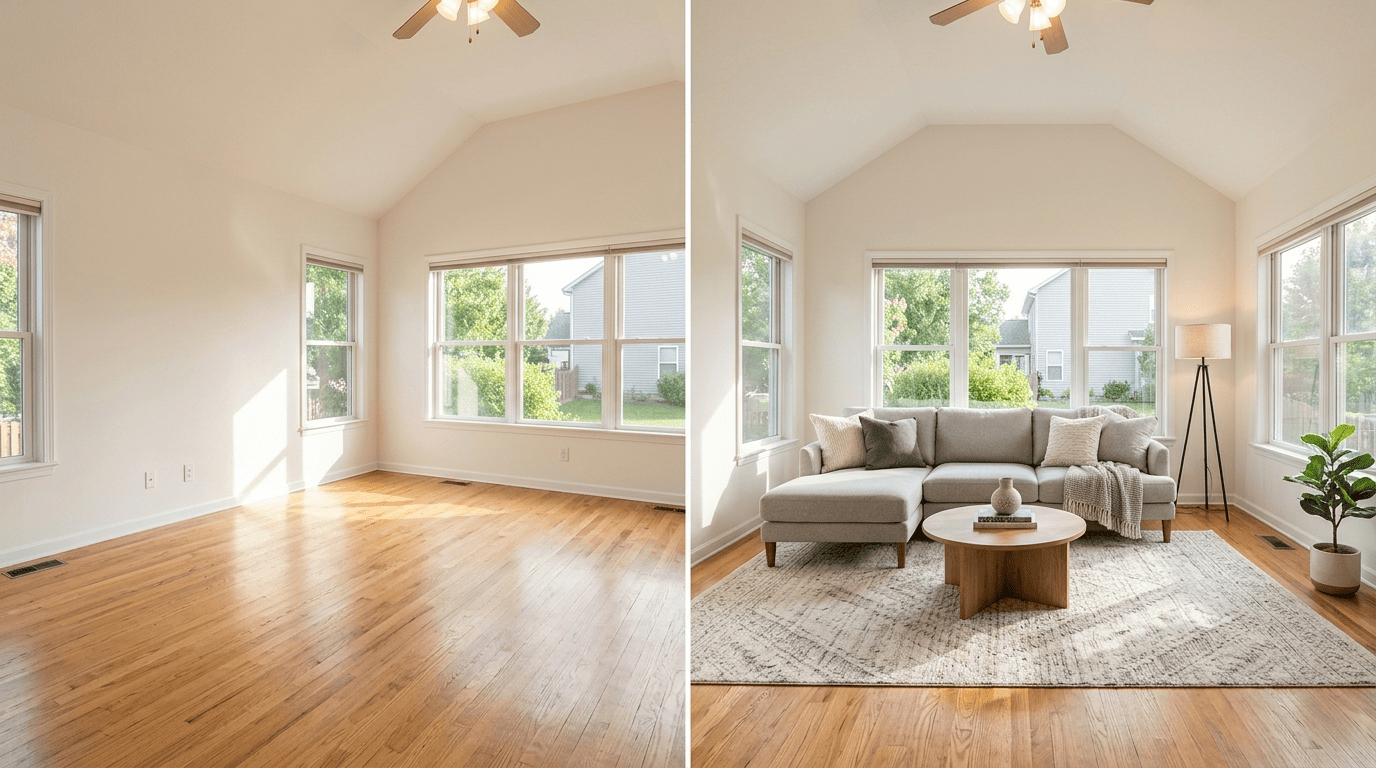
The core feature. Upload a photo, pick a style, and the AI adds furniture and decor on top of the real room. Independent reviews consistently note that walls, windows, and ceiling lines stay untouched, which is the single most important property for MLS use.
Decluttering and object removal
Clears personal items and clutter from furnished rooms. Useful on listings where the seller is still living in the home and you need clean photos without asking them to repack.
Exterior tools
Sky replacement, lawn enhancement, and day-to-dusk lighting are listed in reviews. Exterior photos decide first-click behavior on listing portals, so having these in the same subscription as staging saves a separate tool.
Conversational editing (Pro and above)
Describe a change in plain language and the AI regenerates, for example swapping cabinets or changing a wall color. Reviews report that chatting and exploring ideas costs no credits; only the final render does. One caution: remodel-style edits show what a room could look like, not what it is. Use them for seller presentations, never for MLS photos.
Real product discovery
Staged furniture can be tied to real, shoppable products from retailers such as IKEA, Target, and Wayfair, and you can set budget and ZIP code. For agents it is a talking point with buyers and sellers more than a daily workflow feature.
Batch processing
Higher plans let you process up to 50 photos in one pass. Check which plan your pricing page lists this under, since third-party sources disagree on the tier.
REimagineHome Pricing in 2026: How Credits Work
REimagineHome sells monthly credit allowances, not unlimited staging. Here are the plans as widely reported in August 2026 reviews, with the cost per credit worked out so you can compare plans fairly:
| Plan | Monthly price | Credits / month | Cost per credit | Best for |
| Essential | $14 | 30 | ~$0.47 | 1–2 listings a month, no chat editing |
| Pro | $49 | 200 | ~$0.25 | 3–16 listings a month, chat editing, real product discovery |
| Advanced | $74 | 400 | ~$0.19 | Busy solo producers and small teams |
| Agency | $99 | 900 | ~$0.11 | Teams and high-volume offices |
Plans and credit allowances change. Confirm the current numbers on REimagineHome’s pricing page before you subscribe, then plug them into the formula used throughout this review: price ÷ credits = cost per credit.
How credits behave, per independent reviews:
- Only final renders consume credits. Chatting and idea exploration is free on plans that include conversational mode.
- Monthly credits expire at the end of each billing cycle. There is no rollover, so a quiet month is money spent on nothing.
- The entry plan uses the older tool set without chat refinement.
- New accounts get a few free designs to test quality. Start there on a real listing: try REimagineHome free.
REimagineHome Review Worked Example: What Staging Really Costs per Listing
Pricing tables hide the real question: how many credits does a finished listing burn? Here is the math for a solo agent we will call Dana, who lists three homes a month.
Assumptions: Dana stages 6 photos per listing (living room, dining room, primary bedroom, two secondary bedrooms, home office). She needs about 2 renders per photo to get one she is happy with. We assume 1 credit = 1 render, which independent reviews describe but you should confirm on your own account during the free designs.
- Delivered photos per month: 3 listings × 6 photos = 18 photos.
- Credits needed: 18 photos × 2 renders = 36 credits.
- Essential plan (30 credits): 6 credits short. To stay inside it, Dana would need to average 1.7 renders per photo (30 ÷ 18). Cost per delivered photo: $14 ÷ 18 = $0.78.
- Pro plan (200 credits): covers the month with 164 credits left over, and those expire. Cost per delivered photo: $49 ÷ 18 = $2.72.
- Human-edited comparison: 18 photos × $30 per image = $540 a month. Pro saves $491 (about 91%). Essential saves $526 (about 97%).
Dana’s decision: Essential works only if she is disciplined about re-rolls. Pro costs $35 more a month (which buys 170 extra credits and conversational editing) and removes the credit counting. A simple rule: pick the cheapest plan whose credits cover your expected renders plus a 25% buffer. Dana needs 36 × 1.25 = 45 credits, so by that rule she lands on Pro.
The same math, stretched across plans, shows where each tier stops making sense. This assumes 12 credits per listing (6 photos × 2 renders):
| Plan | Listings covered per month | Cost per listing if you use every credit |
| Essential ($14) | 2.5 | $5.60 |
| Pro ($49) | 16.7 | $2.94 |
| Advanced ($74) | 33.3 | $2.22 |
| Agency ($99) | 75 | $1.32 |
Read the last column carefully: those costs only apply if you actually use the credits. Dana on Pro uses 36 of 200, so her real cost per listing is $49 ÷ 3 = $16.33, not $2.94. Credits that expire are the hidden cost of every higher tier.
Your move: stage your first real listing on the free designs, write down how many credits it used per keeper photo, and replace my assumption of 2 renders per photo with your actual number. That one figure decides your plan.
MLS Rules: What You Must Do With Any Staged Photo
The tool cannot do compliance for you. Four habits cover most of the risk:
- Label every staged photo as virtually staged and add a disclosure line in the listing remarks. Exact wording varies by MLS, so ask your broker for your board’s rule.
- Keep the original, unedited photo on file so you can produce it if a buyer questions the image.
- Never use remodel-style outputs (new cabinets, flooring, wall changes) in MLS photos. Staging adds furniture; remodeling shows things that do not exist.
- Follow the honesty standard behind all of it. Article 12 of the NAR Code of Ethics requires a true picture in advertising and marketing; see NAR’s case interpretations related to Article 12. Our virtual staging guide has a longer compliance checklist.
REimagineHome Review: Pros and Cons
What it does well
- Independent reviewers report realistic lighting and shadow matching, which separates usable renders from floating-furniture renders.
- Walls, windows, and ceiling lines stay untouched in staging mode.
- You pay credits only for final renders, and chat refinements are free on Pro and above.
- Staging, decluttering, and exterior cleanup sit under one subscription.
- You can test quality on free designs before paying.
Where it falls short
- Monthly credits expire, so slow months waste money.
- The entry plan has no chat editing and its credits run out fast once you pass two listings.
- Precision control is limited. Exact dimensions or pixel-level edits are not realistic with AI.
- Some renders need re-rolls. Budget about two per photo until you know your own rate.
- Published prices and credit allowances vary between sources, so always verify on the pricing page.
REimagineHome vs the Alternatives (Quick Comparison)
| Tool | Model | Starting price | Better than REimagineHome when… |
| Collov AI | Subscription | ~$19/mo | You stage 20+ listings a month and want unlimited revisions |
| Apply Design | Per image | $7–$29 per image | You need hand-directed detail on a few luxury photos |
| Virtual Staging AI | Photo-capped plans | ~$16–$79/mo billed yearly | You prefer a fixed photos-per-month cap over counting credits (an August 2026 comparison lists a ~$19 plan with 20 photos) |
| BoxBrownie | Human-edited, per image | $24–$30 per image | You need polished hero shots on a luxury listing |
Full pricing and verdicts for each are in our best virtual staging software guide and our best AI virtual staging software guide.
REimagineHome Review Verdict: Who Should Buy It
Best for: agents staging two or more listings a month who want realistic, MLS-safe staging plus exterior cleanup under one subscription, and who will use their credits before they expire.
Not for: agents staging less than one listing every two months (a per-image service costs less over a year), agents who need hand-edited polish on $2M+ listings (use a human-edited service for those hero shots), and anyone who hates counting credits (a photo-capped plan may suit you better).
How to Stage Your First Listing With REimagineHome (7 Steps)
Menu names may differ slightly as the product updates, but the workflow holds:
- Start on the free designs with one real listing photo. No card needed.
- Upload the original, straight-on photo. If the room is furnished and you want it empty, declutter first.
- Pick a style that matches the buyer in that neighborhood. Keep it simple; neutral beats clever.
- Generate, then compare the render against the original. Walls, windows, doors, and flooring must be unchanged.
- Re-roll or refine (chat on Pro and above). Track how many credits each keeper photo costs.
- Download the high-resolution file and add a clear “virtually staged” label.
- Upload to the MLS with the disclosure in the remarks, and save both the original and staged versions in one folder.
The credits used on that first listing are the number that replaces my assumption in the worked example above.
Which REimagineHome Plan Should You Pick?
Match your monthly listing volume to a plan using the coverage table above (12 credits per listing):
| Your situation | Start with |
| Testing, or fewer than 1 listing a month | Free designs first, then Essential. Under one listing every two months, a per-image service is cheaper. |
| 1–2 listings a month | Essential, if you can live without chat editing |
| 3–16 listings a month, or you want chat editing | Pro |
| 17–33 listings a month, or a small team | Advanced |
| Team or brokerage batches | Agency |
4 Mistakes That Waste Credits
Buying Pro for credits you never use. Credits expire monthly. Pay for the features you need, not for headroom you will not touch.
Staging every photo. Stage the four to six rooms that sell the layout (living, dining, primary bedroom, flex space). Bathrooms and closets rarely earn their credits.
Putting remodel outputs on the MLS. Keep those for seller presentations.
Skipping the original-versus-render check. Floating furniture and altered fixtures are what get listings flagged.
Frequently Asked Questions
Is REimagineHome free?
New accounts get a few free designs with no credit card, according to independent reviews. Paid plans run from $14 to $99 a month.
Is REimagineHome allowed on the MLS?
Most MLS systems allow virtual staging with disclosure, and the tool keeps the room structure intact in staging mode. Rules vary by board, so label every staged photo, add the disclosure to your remarks, keep the originals, and confirm your board’s rule with your broker.
Do REimagineHome credits roll over?
Reviews report that monthly credits expire at the end of each billing cycle. Plan your tier around credits you will actually use.
How many credits does one staged photo use?
Reviews describe one credit per rendered output, with chatting and exploring free on conversational plans. Many photos need one to three renders, so test one listing and measure your own rate.
Is this REimagineHome review based on hands-on testing?
No. It is built from published plans, feature descriptions, and independent 2026 reviews, and it says so. Run the free designs on one of your own listings to confirm quality before paying.
Is REimagineHome better than Collov AI?
It depends on volume. Collov AI is built for very high listing counts at a lower monthly price. REimagineHome is the stronger pick when you want exterior cleanup, chat editing, and realistic lighting in the same tool.
The Bottom Line
The short version of this REimagineHome review: it pays for itself if you stage regularly and use your credits, and it wastes money if you do not. Run your first listing on the free designs, measure your real credits per keeper photo, pick the cheapest plan that covers that number plus a 25% buffer, and label every staged photo. Do those four things and the cost per listing stays in the single digits.
What to Read Next
That covers REimagineHome. For the rest of your listing marketing stack:
- ➡️ Best Virtual Staging Software for Real Estate Agents (2026) — five tools compared, plus the MLS checklist.
- ➡️ Best AI Virtual Staging Software for Real Estate (2026) — AI-only comparison.
- ➡️ Best Real Estate Listing Media Platforms (2026) — photography, 3D tours, and AI video.
- ➡️ 7 Best AI Tools for US Real Estate Agents (2026) — the broader AI toolkit.
- ➡️ Best Real Estate Website Builders (2026) — where your staged photos go to attract leads.
REimagineHome and all other product names mentioned are trademarks of their respective owners. This article is independent and is not sponsored by or endorsed by any company named. Pricing and feature information comes from public sources as of late summer 2026 and may have changed; confirm current details with each vendor and your local MLS before purchasing.