Disclosure: Some links in this article are affiliate links. If you sign up through one of them, we may earn a commission at no extra cost to you. Our opinions are our own, and we point out where a different tool fits better.
This REimagineHome review answers the three questions agents ask before paying for an AI staging tool: what does it cost per listing, does it hold up on the MLS, and is it better than the cheaper alternatives? Short answer: it is a strong pick if you stage two or more listings a month, and an expensive habit if you stage one listing a quarter. The sections below show exactly where that line sits, including a worked cost example you can re-run with your own numbers.
How this REimagineHome review was built: from REimagineHome’s published plans and feature descriptions plus independent 2026 reviews, not from a long-term hands-on test. The tool offers free designs with no card required, so the fastest way to settle the quality question is to run one of your own listing photos through it before you pay anything. For a side-by-side with other tools, see our best virtual staging software guide.
Quick Verdict: REimagineHome Review in 60 Seconds
Question
Answer
Best for
Agents staging 2+ listings a month who want MLS-safe staging plus exterior cleanup in one tool
Price range
$14–$99/month, credit-based (see the pricing section below)
Free option
Yes — a few free designs, no credit card required (as reported by independent reviews)
Strongest points
Realistic lighting and shadows, structure stays untouched in staging mode, shoppable furniture, chat refinements cost no credits on Pro and above
Weak points
Monthly credits expire, chat editing is not on the entry plan, limited precision control
Skip it if
You stage less than one listing every two months (pay per image instead) or need hand-edited luxury hero shots
What REimagineHome Is (and Who Built It)
REimagineHome is an AI virtual staging and redesign platform built by Styldod, a company with a background in real estate media and virtual staging services. Independent reviews put it at more than 1.5 million registered accounts, with real estate agents among the biggest user groups. You upload a room photo; the AI furnishes it, clears clutter, or restyles it in seconds. Only final renders use credits.
REimagineHome Review: What You Actually Get
Virtual staging for empty and furnished rooms
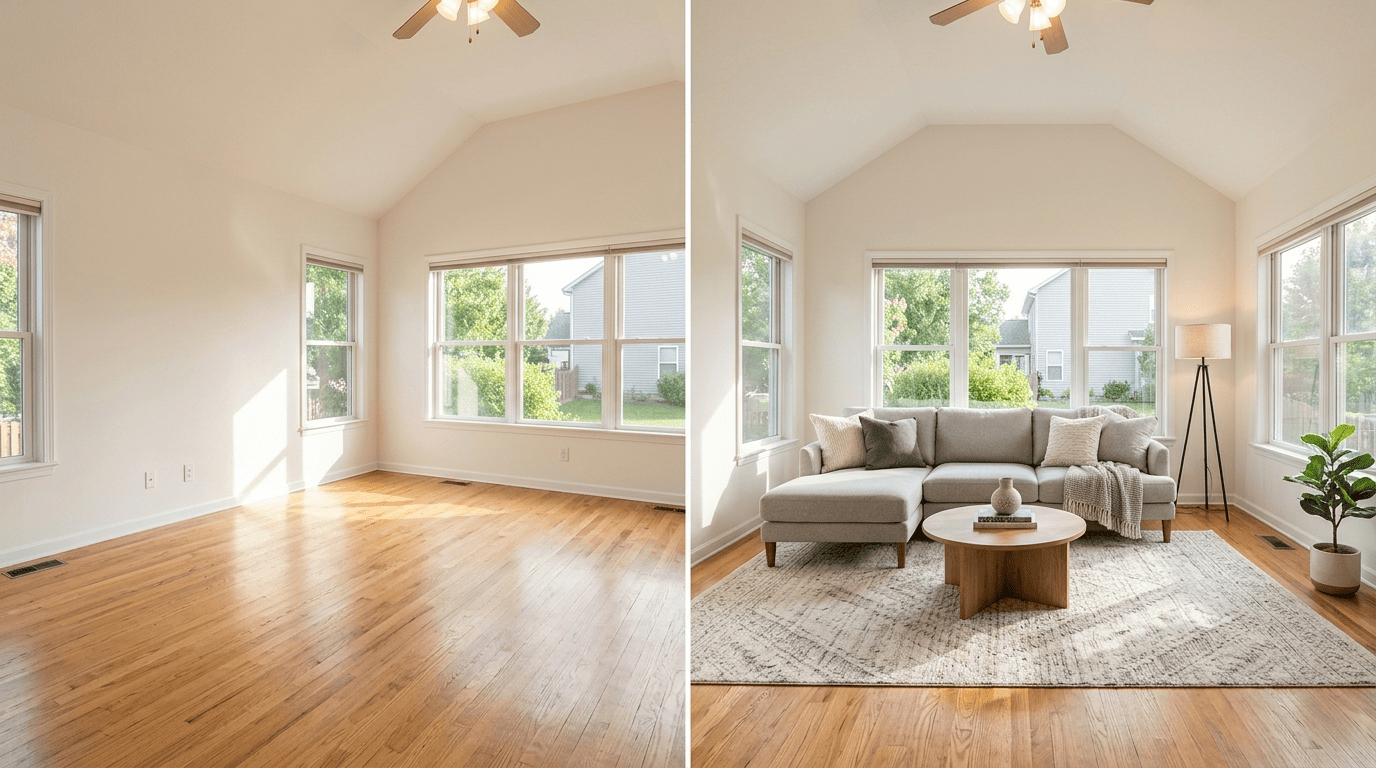
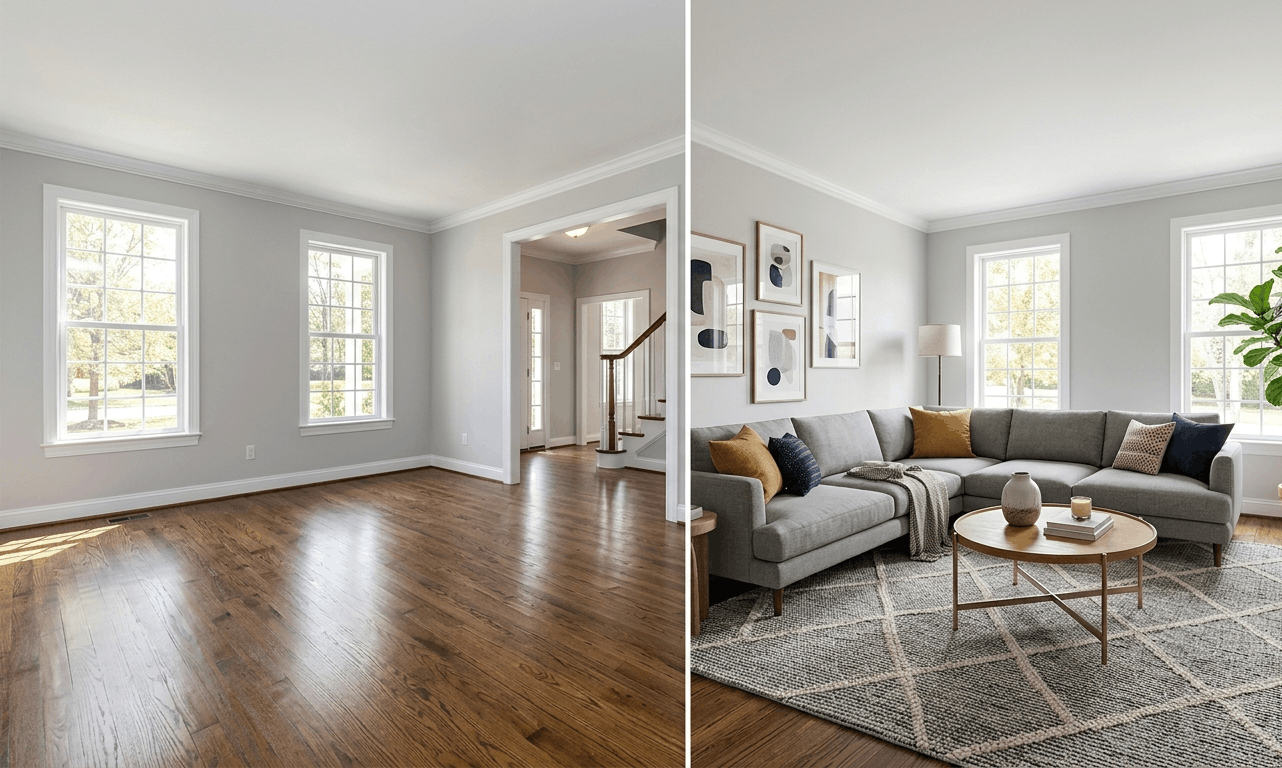
The core feature. Upload a photo, pick a style, and the AI adds furniture and decor on top of the real room. Independent reviews consistently note that walls, windows, and ceiling lines stay untouched, which is the single most important property for MLS use.
Decluttering and object removal
Clears personal items and clutter from furnished rooms. Useful on listings where the seller is still living in the home and you need clean photos without asking them to repack.
Exterior tools
Sky replacement, lawn enhancement, and day-to-dusk lighting are listed in reviews. Exterior photos decide first-click behavior on listing portals, so having these in the same subscription as staging saves a separate tool.
Conversational editing (Pro and above)
Describe a change in plain language and the AI regenerates, for example swapping cabinets or changing a wall color. Reviews report that chatting and exploring ideas costs no credits; only the final render does. One caution: remodel-style edits show what a room could look like, not what it is. Use them for seller presentations, never for MLS photos.
Real product discovery
Staged furniture can be tied to real, shoppable products from retailers such as IKEA, Target, and Wayfair, and you can set budget and ZIP code. For agents it is a talking point with buyers and sellers more than a daily workflow feature.
Batch processing
Higher plans let you process up to 50 photos in one pass. Check which plan your pricing page lists this under, since third-party sources disagree on the tier.
REimagineHome Pricing in 2026: How Credits Work
REimagineHome sells monthly credit allowances, not unlimited staging. Here are the plans as widely reported in August 2026 reviews, with the cost per credit worked out so you can compare plans fairly:
Plan
Monthly price
Credits / month
Cost per credit
Best for
Essential
$14
30
~$0.47
1–2 listings a month, no chat editing
Pro
$49
200
~$0.25
3–16 listings a month, chat editing, real product discovery
Advanced
$74
400
~$0.19
Busy solo producers and small teams
Agency
$99
900
~$0.11
Teams and high-volume offices
Plans and credit allowances change. Confirm the current numbers on REimagineHome’s pricing page before you subscribe, then plug them into the formula used throughout this review: price ÷ credits = cost per credit.
How credits behave, per independent reviews:
Only final renders consume credits. Chatting and idea exploration is free on plans that include conversational mode.
Monthly credits expire at the end of each billing cycle. There is no rollover, so a quiet month is money spent on nothing.
The entry plan uses the older tool set without chat refinement.
New accounts get a few free designs to test quality. Start there on a real listing: try REimagineHome free.
REimagineHome Review Worked Example: What Staging Really Costs per Listing
Pricing tables hide the real question: how many credits does a finished listing burn? Here is the math for a solo agent we will call Dana, who lists three homes a month.
Assumptions: Dana stages 6 photos per listing (living room, dining room, primary bedroom, two secondary bedrooms, home office). She needs about 2 renders per photo to get one she is happy with. We assume 1 credit = 1 render, which independent reviews describe but you should confirm on your own account during the free designs.
Essential plan (30 credits): 6 credits short. To stay inside it, Dana would need to average 1.7 renders per photo (30 ÷ 18). Cost per delivered photo: $14 ÷ 18 = $0.78.
Pro plan (200 credits): covers the month with 164 credits left over, and those expire. Cost per delivered photo: $49 ÷ 18 = $2.72.
Human-edited comparison: 18 photos × $30 per image = $540 a month. Pro saves $491 (about 91%). Essential saves $526 (about 97%).
Dana’s decision: Essential works only if she is disciplined about re-rolls. Pro costs $35 more a month (which buys 170 extra credits and conversational editing) and removes the credit counting. A simple rule: pick the cheapest plan whose credits cover your expected renders plus a 25% buffer. Dana needs 36 × 1.25 = 45 credits, so by that rule she lands on Pro.
The same math, stretched across plans, shows where each tier stops making sense. This assumes 12 credits per listing (6 photos × 2 renders):
Plan
Listings covered per month
Cost per listing if you use every credit
Essential ($14)
2.5
$5.60
Pro ($49)
16.7
$2.94
Advanced ($74)
33.3
$2.22
Agency ($99)
75
$1.32
Read the last column carefully: those costs only apply if you actually use the credits. Dana on Pro uses 36 of 200, so her real cost per listing is $49 ÷ 3 = $16.33, not $2.94. Credits that expire are the hidden cost of every higher tier.
Your move: stage your first real listing on the free designs, write down how many credits it used per keeper photo, and replace my assumption of 2 renders per photo with your actual number. That one figure decides your plan.
MLS Rules: What You Must Do With Any Staged Photo
The tool cannot do compliance for you. Four habits cover most of the risk:
Label every staged photo as virtually staged and add a disclosure line in the listing remarks. Exact wording varies by MLS, so ask your broker for your board’s rule.
Keep the original, unedited photo on file so you can produce it if a buyer questions the image.
Never use remodel-style outputs (new cabinets, flooring, wall changes) in MLS photos. Staging adds furniture; remodeling shows things that do not exist.
Best for: agents staging two or more listings a month who want realistic, MLS-safe staging plus exterior cleanup under one subscription, and who will use their credits before they expire.
Not for: agents staging less than one listing every two months (a per-image service costs less over a year), agents who need hand-edited polish on $2M+ listings (use a human-edited service for those hero shots), and anyone who hates counting credits (a photo-capped plan may suit you better).
How to Stage Your First Listing With REimagineHome (7 Steps)
Menu names may differ slightly as the product updates, but the workflow holds:
Start on the free designs with one real listing photo. No card needed.
Upload the original, straight-on photo. If the room is furnished and you want it empty, declutter first.
Pick a style that matches the buyer in that neighborhood. Keep it simple; neutral beats clever.
Generate, then compare the render against the original. Walls, windows, doors, and flooring must be unchanged.
Re-roll or refine (chat on Pro and above). Track how many credits each keeper photo costs.
Download the high-resolution file and add a clear “virtually staged” label.
Upload to the MLS with the disclosure in the remarks, and save both the original and staged versions in one folder.
The credits used on that first listing are the number that replaces my assumption in the worked example above.
Which REimagineHome Plan Should You Pick?
Match your monthly listing volume to a plan using the coverage table above (12 credits per listing):
Your situation
Start with
Testing, or fewer than 1 listing a month
Free designs first, then Essential. Under one listing every two months, a per-image service is cheaper.
1–2 listings a month
Essential, if you can live without chat editing
3–16 listings a month, or you want chat editing
Pro
17–33 listings a month, or a small team
Advanced
Team or brokerage batches
Agency
4 Mistakes That Waste Credits
Buying Pro for credits you never use. Credits expire monthly. Pay for the features you need, not for headroom you will not touch.
Staging every photo. Stage the four to six rooms that sell the layout (living, dining, primary bedroom, flex space). Bathrooms and closets rarely earn their credits.
Putting remodel outputs on the MLS. Keep those for seller presentations.
Skipping the original-versus-render check. Floating furniture and altered fixtures are what get listings flagged.
Frequently Asked Questions
Is REimagineHome free?
New accounts get a few free designs with no credit card, according to independent reviews. Paid plans run from $14 to $99 a month.
Is REimagineHome allowed on the MLS?
Most MLS systems allow virtual staging with disclosure, and the tool keeps the room structure intact in staging mode. Rules vary by board, so label every staged photo, add the disclosure to your remarks, keep the originals, and confirm your board’s rule with your broker.
Do REimagineHome credits roll over?
Reviews report that monthly credits expire at the end of each billing cycle. Plan your tier around credits you will actually use.
How many credits does one staged photo use?
Reviews describe one credit per rendered output, with chatting and exploring free on conversational plans. Many photos need one to three renders, so test one listing and measure your own rate.
Is this REimagineHome review based on hands-on testing?
No. It is built from published plans, feature descriptions, and independent 2026 reviews, and it says so. Run the free designs on one of your own listings to confirm quality before paying.
Is REimagineHome better than Collov AI?
It depends on volume. Collov AI is built for very high listing counts at a lower monthly price. REimagineHome is the stronger pick when you want exterior cleanup, chat editing, and realistic lighting in the same tool.
The Bottom Line
The short version of this REimagineHome review: it pays for itself if you stage regularly and use your credits, and it wastes money if you do not. Run your first listing on the free designs, measure your real credits per keeper photo, pick the cheapest plan that covers that number plus a 25% buffer, and label every staged photo. Do those four things and the cost per listing stays in the single digits.
REimagineHome and all other product names mentioned are trademarks of their respective owners. This article is independent and is not sponsored by or endorsed by any company named. Pricing and feature information comes from public sources as of late summer 2026 and may have changed; confirm current details with each vendor and your local MLS before purchasing.
Disclosure: Some links in this article are affiliate links. If you sign up through one of them, we may earn a commission at no extra cost to you. We only recommend tools we genuinely believe help US real estate agents, and all editorial opinions are our own.
Choosing the best virtual staging software for your listings in 2026 isn’t about finding the cheapest AI tool — it’s about matching the staging method to the listing. A $1.99 AI render works perfectly for a $300,000 starter home; a $30 human-edited BoxBrownie image earns its premium on a $3 million luxury listing where every shadow and texture matters. In this guide we compare the five most-used virtual staging and listing media tools for US agents in 2026 — REimagineHome, Collov AI, Apply Design, BoxBrownie, and Matterport — and match each one to the kind of listing it’s actually built for.
Why Virtual Staging Became Table Stakes in 2026
Five years ago, virtual staging was a luxury most agents skipped. Physical staging cost $2,000 to $5,000 per listing, and even the cheapest virtual staging services ran $50 to $100 per image, billed by hand-edited turnaround. So most agents either physically staged the home (expensive), shot it empty (boring), or stuffed the photos with awkward stock furniture in Photoshop (worse than empty). The math just didn’t justify staging most listings.
That math has completely collapsed in 2026. AI-powered virtual staging now ranges from $0.23 to $2 per image, while human-edited services like BoxBrownie charge $16 to $32 per room. For a typical 3-bedroom listing, an agent spends $5 to $50 total with an AI tool or $50 to $100 with a human-edited service. The price of staging one listing dropped by roughly 99% — and the agents who adapted are now staging every listing as a baseline expectation.
And it’s not just cosmetic. The data behind virtual staging is genuinely compelling. Homes with virtual staging sell up to 75% faster, and 83% close at or above asking price. BoxBrownie’s own research claims their photo enhancements help listings sell 50% faster. And for properties with 3D virtual tours specifically, listings spend 25–35% less time on the market and attract higher-quality leads, with luxury segments commanding measurable price premiums.
In other words: in 2026, an agent who shows up to a listing presentation without a staging plan is at a real competitive disadvantage. The cost is no longer the gate — the choice of which staging method is. Whether you’re staging the listing photos that go on your website and MLS, or building a 3D tour that supports your lead generation funnel, the right tool depends on the listing’s price point, your volume, and how much human polish the market expects.
The MLS Disclosure Reality You Can’t Skip
Here’s the part most “best AI staging” articles forget to mention. As AI virtual staging exploded in 2024 and 2025, MLS boards across the US tightened their rules sharply — and a virtually staged photo that isn’t properly disclosed can now get a listing flagged, removed, or get an agent in front of the broker review board.
The general rule in 2026 across most major MLS systems: any virtually staged photo must be clearly disclosed as such, both in the photo caption and in the listing remarks. The exact language varies by MLS, but the safe practice is to label virtually staged images with a visible watermark like “VIRTUALLY STAGED” in the corner of the photo, and add a disclosure line in the listing description.
Two other compliance points worth knowing:
Don’t alter structural elements. AI tools that change or remove fixtures, windows, walls, flooring, or cabinetry from the original photo cross the line from staging into misrepresentation. The best tools (REimagineHome, Apply Design) preserve room fixtures and structural elements by design.
Always keep the original photo on file. If a buyer ever raises a misrepresentation concern, you need to be able to show the original, unedited image.
The good news: the tools we recommend in this guide all handle compliance well when used correctly. The bad news: the tool can’t enforce it for you. You have to add the disclosure label and the listing-remarks line yourself.
Cut through the marketing pages and the differences come down to five things:
AI vs human. AI tools (REimagineHome, Collov, Apply Design) deliver a render in seconds or minutes for pennies. Human-edited services (BoxBrownie) take 24-48 hours and cost 10-100x more — but the polish on a luxury listing can be visibly worth it.
Per-image vs subscription pricing. BoxBrownie and Apply Design charge per image, which makes sense for low-volume agents (1-2 listings/month). Subscription tools (Collov, REimagineHome) make sense once you’re staging 10+ images per month.
Still images vs 3D tours. Most tools here produce staged still photos for MLS and your website. Matterport plays a different game — full immersive 3D walkthroughs that buyers explore room-by-room.
Photorealism and quality. Not all AI staging looks equally real. The cheapest tools sometimes generate floating furniture, mismatched lighting, or hallucinated room features. Premium tools (REimagineHome, Apply Design) match lighting and shadows convincingly.
MLS compliance built in. Does the tool preserve the original room structure (compliant) or generate idealized versions that drift from reality (risky)? This matters more than any other technical feature.
The 5 Best Virtual Staging Tools at a Glance
Tool
2026 pricing
Method
Speed
Best for
REimagineHome
$14–$99/mo subscription
Premium AI
Seconds
Multi-listing agents prioritizing quality
Collov AI
$19–$49/mo subscription
Budget AI
~10 seconds
High-volume agents (20+ listings/mo)
Apply Design
$7–$29 per image
Detail-control AI
~10 minutes
Luxury listings, careful detail control
BoxBrownie
$24–$30 per image
Human-edited
24–48 hours
Polished human quality, pay-per-image
Matterport
Free–$309/mo + tour fees
3D immersive tours
Per-property scan
Luxury, new construction, commercial
Notice the pattern: the more human polish (and the slower the turnaround), the higher the cost — but the lower the per-image cost gets, the more important MLS compliance discipline becomes. We’ll start with the platform most US listing agents end up choosing first in 2026: REimagineHome.
The Premium AI Tier: REimagineHome
This is the tool most US agents adopt first when they get serious about staging in 2026, and for good reason. It hits the sweet spot of price, quality, and compliance better than any other AI tool in the category — and unlike the budget options, it produces results that hold up under scrutiny from luxury buyers and tough MLS boards. If you’re staging more than two or three listings a month and want one platform you won’t have to second-guess, this is where to start.
REimagineHome — The Industry-Standard AI Virtual Staging Tool
REimagineHome has quietly become the default AI staging platform for serious US listing agents, and the industry is finally noticing. HousingWire named it the “Best overall AI virtual staging” tool for 2026, and the reasoning matches what working agents have been saying: the rendered results actually look like real photos.
The pricing is genuinely accessible. REimagineHome runs $14 to $99 per month across its subscription tiers, with priority support on the brokerage plans and what’s widely considered the strongest free trial in the category. The $14/month entry point makes it cheaper than even most budget tools when you factor in usage — and the $99/month brokerage tier is still less than the cost of staging a single luxury home with BoxBrownie.
What you get for the money is the most complete staging toolkit on the AI side of the market. The platform offers virtual staging, redesigning furnished rooms, landscaping, exterior structure rendering, and home remodeling visualization, plus customizations like lawn enhancement, sky replacement, and pool water enhancement. That last category matters more than you’d think — most AI staging tools only handle interiors, but exterior photos are where listings actually win the first-impression battle on Zillow and Realtor.com. Being able to clean up an overcast sky or refresh a tired front lawn in the same tool is a real workflow advantage.
The technical foundation is where it earns the “premium AI” label. The platform stands out for its ability to match lighting and shadows in staged photos, a crucial factor in creating lifelike images, and in professional tests, 70% of REimagineHome’s AI-generated outputs were downloaded, shared, or presented — a measure of how often the staged images are actually usable rather than discarded. For agents who’ve spent hours redoing renders from cheaper tools that produced floating furniture or mismatched lighting, that hit rate is the difference between “I’ll use it on every listing” and “I’ll keep it as a backup.”
Two specific features earn their place on a busy agent’s daily workflow:
Listing Batch Processing — High-volume real estate teams can stage and organize up to 50 photos at once through batch processing. For a team uploading 15+ MLS images per listing across multiple listings per week, this single feature can save hours.
Real Products Discovery — When the AI stages a room, the furniture and decor pieces shown are tied to real, shoppable products. For agents who want to send a staged room to a buyer and say “this couch and these lamps are available at these stores,” it’s a genuinely novel angle.
The platform is also where the cluster ties together — we featured REimagineHome in our AI tools guide and recommended it there too, so this is the deeper deep-dive on the tool itself.
What REimagineHome Actually Costs
Like every subscription tool, the headline number is the floor, not the ceiling. Here’s what an agent actually pays at different usage levels:
Tier
Best for
Approximate cost
Entry / Solo Trial
1–3 listings per month, testing the platform
$14/mo
Solo Standard
5–10 listings per month, regular staging workflow
~$49/mo
Brokerage / Priority
High-volume teams, batch processing, priority support
~$99/mo
Free Trial
Try before subscribing
Free (no credit card required)
At any of these price points, the math on staging a single listing makes the tool pay for itself the first time it shortens days-on-market by even a week. The honest comparison isn’t “REimagineHome vs Collov AI on price per image” — it’s “what does an unstaged photo on your $400,000 listing cost you in lost time and showings?” For most agents, that number is much bigger than $99/month.
Why REimagineHome Hits the MLS Compliance Bar
This is the part that matters most for any virtual staging tool you adopt in 2026. REimagineHome AI prioritizes accuracy, ensuring property representations remain true to their original structure. Walls don’t move, windows don’t disappear, flooring doesn’t change material, fixtures stay where they are. The AI adds furniture and decor on top of the real room rather than reimagining the room itself.
That single design choice is what keeps you on the right side of MLS compliance and out of misrepresentation territory. Tools that “remodel” a room — changing the cabinets, swapping the flooring, or repainting walls — produce images that may look great in a listing presentation but can’t legally go on the MLS without much more aggressive disclosure (and in some markets, can’t go on the MLS at all).
A reminder from Section 1: REimagineHome handles the structural-integrity part for you, but you still have to label every virtually staged photo as such and add a disclosure line in the listing remarks. The tool can’t enforce that — you have to.
REimagineHome Verdict
Best For: US listing agents staging more than two listings a month who want professional, MLS-compliant staging without learning a new tool every quarter. Particularly strong for agents who also want exterior cleanup (sky replacement, lawn enhancement) in the same workflow, and for teams that need batch processing to keep up with volume.
NOT For: Agents staging fewer than one listing every two months (the per-listing economics tilt toward a pay-per-image service like BoxBrownie), agents on luxury listings where every shadow must be hand-perfect (jump to Apply Design or BoxBrownie), or agents primarily marketing on the experience side rather than the photo side (jump to Matterport).
The Budget & Detail-Control AI Tier: Collov AI + Apply Design
These two platforms use the same underlying AI technology as REimagineHome — and yet they sell completely opposite things. Collov AI is for the agent who wants to stage everything, cheaply and fast, on a tight monthly budget. Apply Design is for the agent who’d rather stage fewer listings, slower, with the kind of detail control that produces a single hero image worth fighting over. Same category, opposite use cases. The right pick depends entirely on whether your bottleneck is volume or polish.
Collov AI — The Budget AI Subscription for High-Volume Agents
Collov AI is the platform you reach for when you want to stage every listing on your roster without your monthly tool budget getting weird. The pricing is genuinely aggressive: $19/month at the entry tier, with mid-tier subscriptions around $49/month and 10-second generation times. Effective per-photo cost can run as low as 23 cents at higher usage — making it by some margin the cheapest professional-quality option on this list.
What you get for that price is a focused, high-volume staging workflow. Collov offers 50+ design styles with unlimited free revisions, which matters more than it sounds. Unlimited revisions means you can experiment with three or four different staging looks per room without the meter ticking — useful when you’re not sure whether a beach house works better as coastal-modern or warm-traditional, and want to show the seller both options before committing.
The 10-second render time is the second piece of the puzzle. When you can stage a photo, decide it’s wrong, and re-stage it 90 seconds later, your whole workflow changes. You stop hoarding “perfect” renders and start treating staging as iterative — the way photographers treat raw edits.
Where it earns its tier: for solo agents and small teams managing 20+ listings per month, the subscription math is unbeatable. Collov AI at $19/month is the lowest-cost dedicated entry point with 10-second generation, best for high-volume agents who’d otherwise be paying $24-$30 per image at BoxBrownie’s rate.
The honest caveats. First, style customization is preset-constrained — you pick from the 50+ design themes Collov offers, but you can’t direct the AI as precisely as Apply Design lets you. For most listings that’s fine; for a luxury hero shot where the staging has to match a specific brand aesthetic, you’ll feel the limits. Second, the photorealism, while professional, doesn’t quite match REimagineHome’s lighting/shadow accuracy at the premium tier. The gap is small, but on a $2M+ listing photographed in mixed natural light, small gaps show.
Best For: High-volume listing agents (20+ properties per month), budget-conscious solo agents who’d rather stage every listing than perfectly stage a few, and agents who value fast iteration over hand-controlled detail.
NOT For: Luxury agents whose listings demand luxury-grade polish (REimagineHome or BoxBrownie), agents who need precise creative control over each room (Apply Design), or solo agents staging fewer than 5 listings per month (a per-image tool like Apply Design is cheaper).
Apply Design — The Detail-Control AI for Luxury Listings
Apply Design takes the opposite trade-off. Instead of optimizing for speed and volume, it optimizes for control — letting you direct the AI’s placement and style with the kind of precision a real designer would expect. The cost is exactly what you’d predict: slower renders, per-image pricing, and a workflow that rewards patience rather than batch processing.
Pricing is per-image rather than subscription-based. Apply Design’s standard AI staging runs $29 per image, with DIY editing options starting at $7 per image — making it cheaper than BoxBrownie’s $24-$30 per-image rate, but more expensive than a Collov AI subscription if you’re high-volume.
The trade-off is time. Where REimagineHome or Virtual Staging AI stage a photo in seconds or minutes, Apply Design’s render times run ten minutes or longer per image. For agents managing high volume, that investment may not work. For an agent staging a carefully marketed luxury home where every visual detail matters, the control justifies the wait.
In practice, the workflow looks different from the budget tools. Instead of uploading a photo, picking a preset style, and getting a result back in 30 seconds, you’re directing the AI through more granular controls about furniture placement, style fidelity, and design choices — closer to working with a virtual designer than to running a vending machine. For luxury listings where the staging is part of the brand story, that hand-on-the-wheel control can be the difference between a forgettable render and a hero image you actually want to put on your listing website.
The honest caveats. First, the 10-minute render time is real — plan to batch your staging work into focused sessions rather than fitting renders between calls. Second, the per-image pricing means high volume gets expensive fast: 50 images at $29 each is $1,450, which is more than Collov AI’s annual subscription. The math works only when you’re staging a small number of high-stakes images, not when you’re staging an entire MLS shoot.
Best For: Luxury listing agents who care about every visual detail, designers and design-minded agents who want creative control over placement and style, and agents staging fewer than 10 images per month (where per-image pricing wins over a subscription).
NOT For: High-volume agents (the per-image cost and slow render times will exhaust you), agents who’d rather pick a preset and trust the AI (Collov or REimagineHome will frustrate you less), or anyone who needs same-day staging for an urgent listing.
Budget & Detail-Control Tier Verdict
Collov AI
Apply Design
Starting price (2026)
$19/mo subscription
$7–$29 per image
Pricing model
Subscription
Per-image
Render time
~10 seconds
~10+ minutes
Style control
Preset-constrained (50+ themes)
Hand-directed precision
Revisions
Unlimited (included)
Per-image (you pay again)
Best for
High-volume agents on a budget
Luxury listings, designer-level detail
The simplest way to decide: Collov AI if your bottleneck is volume — you need to stage 20+ listings a month and the staging budget can’t grow with your roster. Apply Design if your bottleneck is polish — you stage fewer listings, but each one needs to look hand-crafted at the level a luxury buyer expects. Most US agents in the mid-market end up not buying either of these and going to REimagineHome instead, because REimagineHome strikes the middle ground both Collov and Apply Design are deliberately pushing past.
The Human-Edited & 3D Tour Tier: BoxBrownie + Matterport
Both tools in this section take a deliberate step away from the AI staging mainstream — in completely different directions. BoxBrownie says: AI is fine, but humans still win on polish, and there’s a $5M listing where that gap matters. Matterport says: staged photos are the wrong format entirely — buyers in 2026 want to walk through the property, not just look at images. Both are premium plays. Neither is for everyone. And both earn their spots in this guide because they do something no AI staging tool can match.
BoxBrownie — The Human-Edited Gold Standard
BoxBrownie has been the human-edited heavyweight of real estate listing media for years, and in 2026 it’s still the platform agents pick when “good enough” isn’t good enough — typically on luxury listings, hero shots, or specialty photo work that can’t tolerate a single uncanny detail.
The pricing is straightforward and per-image, with no subscription. Virtual staging runs $30 per image with a 48-hour turnaround, photo enhancements are $2 per image (a 17-step process including HDR blending, color correction, vertical straightening, sharpening, lawn enhancement, and sky replacement), day-to-dusk conversions are $5, and floor plans run $30 to $40 each. There are no monthly subscription fees. The model is simple: you send photos, humans edit them, you pay per result.
The differentiator is what those humans actually do. Where AI staging tools generate furniture and decor from a model, BoxBrownie uses advanced lighting, shadowing, and micro-texture techniques blended seamlessly so the finished image looks as if the room was traditionally staged. On a $400,000 listing this is overkill. On a $4 million listing it can be the difference between “another nice photo” and “the image that drew the offer.”
The credibility behind the platform is significant. BoxBrownie is used by over 150,000 real estate agents globally, with turnaround under 48 hours and free revisions backed by 24/7 international support. Their internal data claims 83% of staged properties sell at or above asking price — consistent with the broader industry data on staging effectiveness, though as with any vendor stat, take it directionally rather than literally.
The honest cost reality. BoxBrownie’s per-image pricing is the exact opposite of cost-efficient at high volume. For a typical 3-bedroom listing of 8-10 images, BoxBrownie costs $240-$360 versus $1-$2 with AI staging — and for agents staging 2 listings per month, annual costs run $5,760-$7,200 versus $24-$48 with AI. The math only works when you’re staging few listings, strategically, where the human polish actually earns its premium. For an agent staging 20 listings a month at the standard MLS level, you’re burning the equivalent of an extra car payment every month on edits that AI could have produced for pennies.
The other caveat: 48-hour turnaround means you can’t iterate in real time. If you don’t like the first render, you’re waiting another two days for the revision. That’s fine when you’re planning a hero shot a week before a listing presentation. It’s painful when a seller calls and asks “can you change the couch color?” 90 minutes before the open house.
Best For: Luxury listing agents, agents working on a small number of hero-shot images per listing, agents who want hand-edited polish without learning AI tooling, and anyone marketing a $1M+ listing where the staging quality is part of the brand story.
NOT For: High-volume agents (the per-image math destroys you), agents who want to iterate styles in real time, or agents on tight listing-launch deadlines where 48 hours feels like forever.
Matterport — The 3D Virtual Tour Standard
Matterport plays a different game entirely. It’s not a staging tool — it’s a 3D immersive walkthrough platform that lets buyers navigate a property room-by-room from their phone or laptop, the way Google Street View lets you walk a neighborhood. For luxury listings, new construction, and commercial real estate, it’s been table-stakes for years. In 2026 it’s becoming standard equipment in mid-market residential too.
The pricing is unusually complex. Matterport subscriptions range from a free tier to $309/month, with Enterprise pricing on request. Most professionals end up on Professional ($69/month) or Business ($309/month) tiers. Then there’s the hardware: the Pro3 camera costs approximately $5,400+, and an older Pro2 can sometimes be found used for $2,500-$3,500. Each captured tour also incurs $20/month hosting per active space, forever, to keep it live.
For most agents, the smarter move in 2026 is hiring it out. A professional Matterport 3D virtual tour costs $350-$5,000+ depending on property size — residential scans up to 3,000 sqft start at $350, commercial properties run $750-$2,000, and large venues cost $2,000-$5,000+. These prices are for professional scanning service only; Matterport hosting is an additional $20/month. For most real estate professionals and businesses, hiring a service provider at $350-$1,000 per tour is more cost-effective than the $5,400+ camera investment unless you plan to scan 10+ properties per month.
What you get in exchange is a measurable competitive advantage. Properties with Matterport 3D tours spend 25-35% less time on market, attract higher-quality leads, and in luxury segments can command price premiums. The “Matterport effect” is the most quantifiable ROI in real estate listing media, and the reason every luxury listing in markets like Miami, LA, Aspen, and New York now defaults to one.
Two important 2026 caveats that older guides miss. First, Zillow removed Matterport integration in 2024, forcing real estate professionals to find alternative ways to showcase Matterport tours on their Zillow listings — the workaround is to link to the tour from your listing description, but the seamless embed is gone. Second, Matterport was acquired by CoStar, and pricing changes and feature restructuring are ongoing as CoStar integrates Matterport into its real estate data ecosystem. Translation: lock in your subscription tier with eyes open, and don’t be surprised if pricing shifts over the next 12-18 months.
Best For: Luxury listing agents, agents marketing new construction or commercial real estate, agents in markets where 3D tours are now standard expectation (Miami, LA, NYC, Aspen, Austin), and high-volume listing agents who can amortize the camera + subscription over 10+ tours per month.
NOT For: Solo agents staging 1-2 mid-market residential listings per month (a $350 service-partner tour can wipe out the margin), agents primarily on Zillow-driven workflows who’d rather have native integration, or anyone uncertain about committing to ongoing per-space hosting fees.
Human-Edited & 3D Tour Tier Verdict
BoxBrownie
Matterport
Starting price (2026)
$24–$30 per image (no subscription)
Free–$309/mo + $350+/tour or $5,400 camera
Pricing model
Per-image
Subscription + per-tour or hardware
Format
Edited still photos
Immersive 3D walkthroughs
Turnaround
48 hours
Per-property scan (1-2 days)
Standout
Human-grade polish + 17-step photo enhancement
Measurable 25-35% reduction in days on market
Best for
Luxury hero shots, low-volume premium listings
Luxury, new construction, commercial, high-end residential
The simplest way to decide: BoxBrownie when the bottleneck is photo polish on a small number of hero images, especially when the listing’s brand requires hand-edited fidelity that AI can’t match. Matterport when the bottleneck is engagement — when buyers need to feel like they’ve walked the property before showing up in person, and a series of still photos doesn’t get them there.
Your Decision Matrix: Match the Tool to the Listing
You’ve seen all five platforms. The mistake most agents make from here is picking the most-impressive tool and then trying to use it on every listing — burning $30 per BoxBrownie image on a $250,000 starter home where AI staging would have worked perfectly, or running every luxury listing through Collov AI when the photo polish doesn’t survive scrutiny. The right approach in 2026 is to match the staging method to the listing, not the listing to the tool. This matrix is built to help you do that.
Tool
Starting price (2026)
Method
Speed
Best for
Collov AI
$19/mo subscription
Budget AI
~10 seconds
High-volume agents (20+ listings/mo)
REimagineHome
$14–$99/mo subscription
Premium AI
Seconds
Multi-listing agents prioritizing quality
Apply Design
$7–$29 per image
Detail-control AI
~10 minutes
Luxury listings, designer-level detail
BoxBrownie
$24–$30 per image
Human-edited
48 hours
Luxury hero shots, hand-edited polish
Matterport
Free–$309/mo + $350+/tour
3D immersive tour
Per-property scan
Luxury, new construction, commercial
Start With This One
A single clean answer for where you are right now:
Just adding staging to your workflow? Start with REimagineHome’s free trial, then move to the $14–$49/mo subscription. It’s the strongest balance of quality, speed, and MLS compliance for most US agents.
Staging 20+ listings per month and need to control the budget?Collov AI at $19/mo unlocks unlimited high-volume staging with 50+ design presets.
Mostly mid-market listings, but one or two luxury listings per quarter? Pair REimagineHome for daily work with BoxBrownie for the hero shots on premium listings — a hybrid stack is cheaper than going all-in on either.
Selling exclusively luxury, new construction, or commercial? Hire a Matterport service partner ($350–$1,000 per property) — the 25–35% reduction in days on market pays for itself by the second listing.
Designer-minded and willing to wait for perfection?Apply Design gives you the hand-on-the-wheel control AI staging usually doesn’t.
The Total-Cost Reality
The headline price for any tool here is the floor, not the ceiling. The real numbers look closer to this:
A serious solo agent using AI staging runs $15–$100/month all-in, which is roughly the cost of dinner-for-two once. The ROI math is unbeatable when even one listing sells a week faster.
A luxury agent using BoxBrownie for hero shots typically spends $200–$500 per listing across the staging and photo enhancement bundle. Reasonable on a $2M+ listing; absurd on a $250K one.
A Matterport-equipped agent either invests $5,400+ in the Pro3 camera plus a $69–$309 monthly subscription plus $20/month per active space — or pays $350–$1,000 per professionally-shot tour plus the same hosting fee. The hire-it-out math wins until you’re past 10 tours per month.
Two practical money rules that save real expense:
Most pros end up running two tools, not one. A primary AI staging tool (REimagineHome or Collov) handles 90% of listings; BoxBrownie or Matterport gets pulled in for the 10% of premium listings where polish or immersion is the brand story. Don’t try to force one tool to do everything.
Use every free trial seriously before subscribing. REimagineHome’s free trial is the strongest in the category, and Matterport has a free tier. Test a real listing through each tool you’re considering — not a demo property — before committing to a paid plan.
The 2026 MLS Compliance Checklist for Virtual Staging
Before you publish a single virtually staged image to the MLS in 2026, run through this. Enforcement is up sharply across major boards, and the disclosure is your protection:
Add a visible “VIRTUALLY STAGED” watermark to every staged image. Lower-right corner, readable but not overwhelming. The exact wording varies by MLS — some require “Virtually Staged,” some accept “Digitally Staged” — but the principle is universal.
Add a disclosure line to your listing remarks. Something simple like “Photos include virtual staging” or “Selected images have been virtually staged.” Don’t bury it; put it in the visible part of the description.
Never alter structural elements. Walls, windows, fixtures, flooring, and cabinetry must stay as they actually are in the property. Adding furniture is staging; remodeling the kitchen in Photoshop is misrepresentation.
Always keep the original unedited photo on file. If a buyer ever raises a misrepresentation concern, you need to be able to produce the original instantly.
Check your specific MLS rules. Disclosure language and watermarking requirements vary by board. Your broker can pull the exact rule for your MLS.
Disclose verbally at showings if buyers ask. Honesty here builds trust — “the photos used virtual staging to show how the space could be furnished, but this is how it looks today” is the right answer, every time.
The tools we recommended in this guide all handle structural compliance well when used correctly — but the disclosure label and the listing-remarks line are your responsibility, not the tool’s. A $1,500 NAR ethics violation per incident is the math that makes the 30 seconds of adding a watermark worth it.
What to Read Next — Your Complete 2026 US Real Estate Tech Stack
Virtual staging is one layer of a complete listing-to-closing operation, not the whole thing. These seven companion guides finish the picture — together they cover the entire modern US real estate business, from first click to closing day:
There’s no single best virtual staging software in 2026 — there’s only the right tool for the listing in front of you. A starter home in a fast-moving market doesn’t need BoxBrownie’s hand-edited polish. A $4 million luxury listing in Aspen probably can’t be served by a $0.23-per-image AI render alone. The agents who win in 2026 aren’t the ones with the most expensive staging stack — they’re the ones who match the tool to the listing, stay scrupulously compliant with MLS disclosure rules, and stage every listing because the cost has finally collapsed to where every listing deserves it.
Pick the row from the matrix that fits the listing you’re staging this week. Run the free trial first. Add the disclosure watermark every single time. And remember: in 2026, an empty room photograph is no longer the safe default — it’s the missed opportunity. The agents who understood that in 2024 are the ones whose listings have been moving 50–75% faster ever since.